HTML, Markdown or a URL in.
PDF bytes out.
PDFMint is a PDF generation API and an n8n community node. One POST with the content you already have — no template editor to learn, no template ID to paste, no second request to fetch the file.
10 documents a month free No card Every feature on every plan
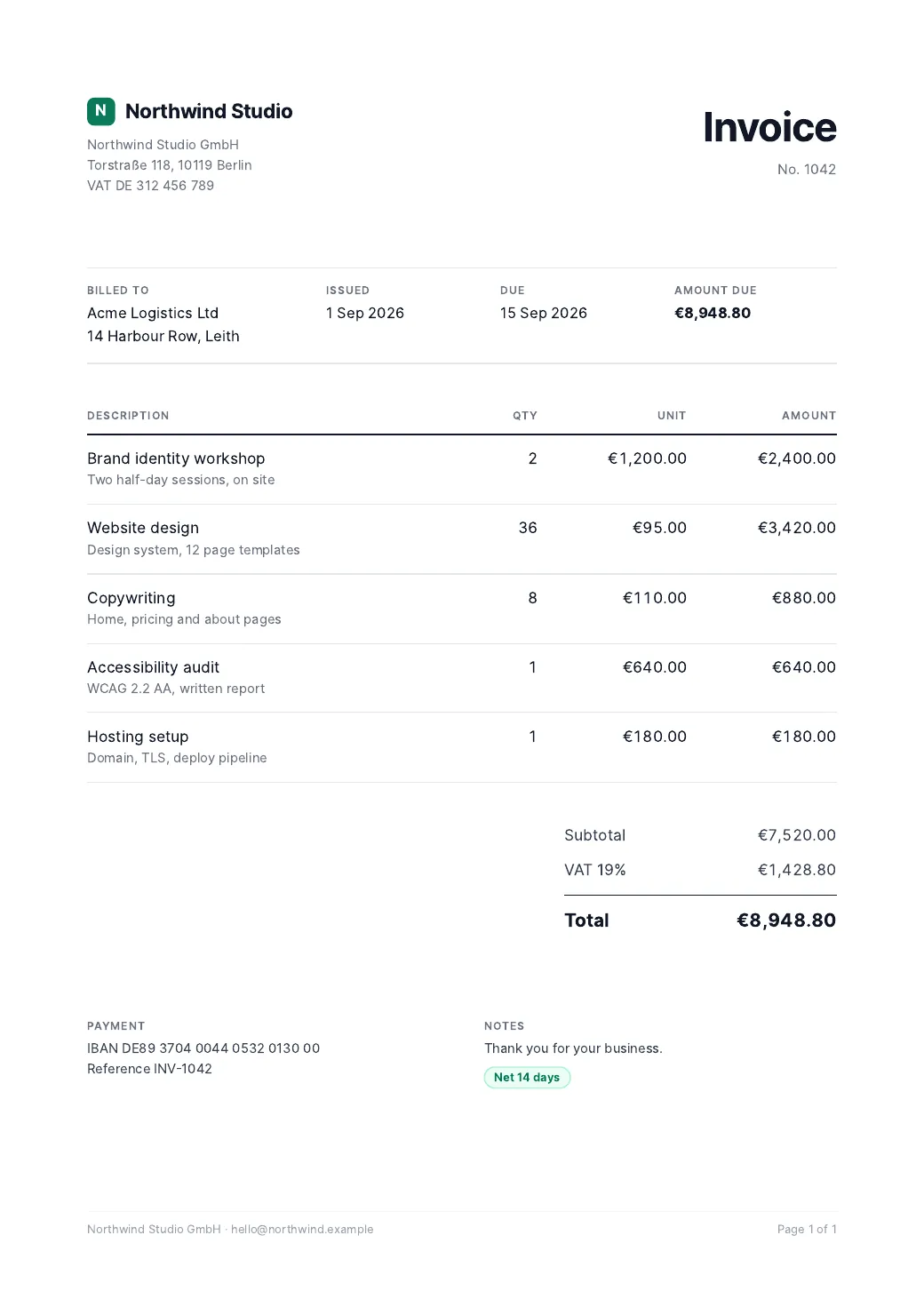
# No key, no signup. 5 renders an hour per address.
curl -s https://pdf.mintapis.com/examples/invoice-1042.html \
  | jq -Rs '{html: .}' \
  | curl -X POST https://pdf.mintapis.com/v1/demo/pdf \
      -H "Content-Type: application/json" \
      --data-binary @- --output invoice-1042.pdf
const res = await fetch('https://pdf.mintapis.com/v1/pdf', {
method: 'POST',
headers: {
Authorization: `Bearer ${process.env.PDFMINT_KEY}`,
'Content-Type': 'application/json',
},
body: JSON.stringify({
html: '<h1>Invoice {{number}}</h1><p>Due {{due}}</p>',
data: { number: '1042', due: '2026-09-15' },
strict: true, // fail loudly on a typo'd placeholder
options: { format: 'A4', margin: '18mm', pageNumbers: true },
}),
});
// The response IS the PDF. Nothing else to fetch.
const pdf = Buffer.from(await res.arrayBuffer());
console.log(res.headers.get('X-PDFMint-Pages'), pdf.length);// Paste this straight onto an n8n canvas (Ctrl+V).
{
"nodes": [
{
"name": "PDFMint",
"type": "n8n-nodes-pdfmint.pdfMint",
"typeVersion": 1,
"position": [640, 300],
"parameters": {
"operation": "pdf",
"source": "markdown",
"markdown": "=# Invoice {{ $json.number }}",
"output": "binary",
"fileName": "=invoice-{{ $json.number }}.pdf",
"options": { "margin": "18mm", "pageNumbers": true }
}
}
]
}The page above is the PDF that request returned from the live demo endpoint on 26 September 2026, rasterised and nothing else. The HTML · the PDF.
POST /v1/pdf call (an <h1>, 20 mm margin), p95 733 ms, measured 2026-08-26 with bench/render-latency.mjs from one machine in Germany — network round trip included.PDFMint is new — these are the only numbers we have measured, so they are the only ones we quote. The keyless demo in the curl tab is a separate, rate-limited endpoint on the same renderer; its timings vary with load, so we do not quote them.
How it works
Three steps, one of them is yours
No SDK to install and no template to build first. If you can send an HTTP request, you can make a PDF.
-
Get a key
Create an account with an email address and copy the
pm_live_…key off the dashboard. 10 documents a month, free, no card. -
POST what you already have
HTML, Markdown, a public URL or the name of a saved template, plus a
dataobject for the placeholders.{ "html": "<h1>Invoice {{number}}</h1>", "data": { "number": "1042" } } -
The response is the file
The body is the PDF itself, with
X-PDFMint-Pagesand the credits left in the headers. Or ask for"output": "url"and get an expiring link.
One endpoint, four inputs
Send what you already have
POST /v1/pdf takes exactly one of these four fields. Send two and it tells you which two, instead of quietly picking one.
Your own markup
Full CSS control. printBackground is on by default, so your colours and shading survive the print pipeline.
Markdown, print-ready
Rendered with a stylesheet built for paper: table rows never split across a page break, headings never orphan, code blocks wrap.
A public page
Wait for a delay, a CSS selector or networkidle before capture. Private and link-local addresses are refused.
A saved template
Addressed by name — "template": "invoice", not a hex id. Get the name wrong and the error lists the names you do have.
The details that usually bite
Chrome’s sharp edges, filed down
Most of what goes wrong with headless-Chrome PDFs goes wrong silently. These are handled in the renderer, not left in your lap.
Page numbers that fit
Chrome clips a footer that does not fit inside the page margin. Set pageNumbers: true and the bottom margin is widened for you, so “Page 2 of 7” is actually on the page.
Headers that are not blank
Chrome renders header and footer templates at font-size 0, which is why they so often come out empty. Your markup is wrapped in a readable container and laid out first, so the margin is sized to the header you actually wrote.
Placeholders that speak up
A placeholder your data does not fill is reported in X-PDFMint-Warning, or refused outright with "strict": true. A key typo never ships as a blank invoice.
Passwords on every plan
Send "password" and the PDF comes back AES-256 encrypted via qpdf, with a separate owner password and print/copy permissions. Included on the free tier too.
Type that renders
Inter, JetBrains Mono, Noto CJK and Noto Color Emoji ship inside the container. Chinese, Japanese, Korean and emoji come out as glyphs, not tofu boxes.
Renders that wait
waitFor takes milliseconds, a CSS selector or "networkidle" — so a chart that draws itself after load is in the PDF instead of half-painted.
SSRF-guarded fetches
Every URL you hand to url or merge has its DNS resolved before we fetch it, so a hostname pointing at 169.254.169.254 is caught too. file: and data: are refused.
Errors you can act on
Every error carries a machine code, a plain-English message, a hint and a link to the exact docs anchor. A failed render is refunded, so you are not billed for it.
Paper you control
A0–A6, Letter, Legal, Tabloid, Ledger or an exact width and height. Landscape, per-side margins, scale, page ranges, screen media and @page sizes.
Integrations · n8n community node
The file comes back on the node
Install n8n-nodes-pdfmint, paste your API key once, and the PDF arrives as binary data on the PDFMint node itself. We build PDFMint and publish the node, so the node and the API it calls are maintained by the same people. Verified by n8n — it is listed in n8n’s community-node registry with isPublished: true, the list n8n Cloud installs from. Check it yourself, without an account, in https://api.n8n.io/api/community-nodes.
- Ready-made workflows. Nine reviewed workflows in n8n’s gallery — six use PDFMint directly, three more DocMint and MailMint — each run in a real n8n before publishing.
-
No second HTTP Request node. The node calls
prepareBinaryData, so the file is attached to the item and ready for Gmail, Drive, S3 or Slack. - Templates are a dropdown. The node loads the templates on your account, so you pick a name instead of pasting an id.
-
usableAsTool: true. An n8n AI Agent can call PDFMint directly as a tool. Neither the CraftMyPDF nor the pdforge node declares this. - Four operations. Generate PDF, Generate Image, Merge PDFs and Get Usage — the same account, the same credential.
The node also puts pages, durationMs, creditsRemaining and any warning on the item’s JSON, next to the binary — so a downstream IF node can act on them.
n8n verified
The community node, on n8n Cloud and self-hosted — and the two ways to do HTML to PDF in n8n that do not involve us.
Zapier private beta
Generate PDFs and images, render saved templates and merge PDFs inside a Zap. Invite link on the page; not in Zapier’s public directory yet.
Plain HTTP any platform
Everything else — your backend, a cron job, an HTTP module in another automation tool. One bearer token, an OpenAPI 3.1 spec at /openapi.json.
The rest of the API
Five endpoints, one key
The same pm_live_… bearer token everywhere. Every response tells you what it cost you.
Generate a PDF
Bytes by default. Or "output": "url" for an expiring hosted link (one hour by default, up to seven days), or "base64" when your platform insists on JSON.
Generate a PNG or JPEG
The same inputs, rendered as an image. Full-page or a fixed viewport, retina scale factor, optional transparent background.
Merge up to 50 PDFs
Public URLs, base64, or a mix of both. Optionally rewrite the title and author metadata on the joined document.
Templates and usage
Store reusable HTML under a name you choose, with its own default page options. GET /v1/me returns your plan, credits used and remaining, and the reset date.
| Limit | Value | What happens at the edge |
|---|---|---|
| Request body | 12 MB | 413 with the size in the message |
| Rendered HTML | 10 MB | Refused, with a hint about inline base64 images |
| Render timeout | 30 s default, 120 s max | Set "timeout" per request |
| Merge inputs | 50 files | Refused with the count you sent |
| Hosted file | 20 MB, 7 days max | Binary output has no size limit |
How it compares
Measured against the alternatives
Everything below is taken from the vendors’ own published specs, pricing pages and n8n node source. The sources are named under the table.
| Feature | PDFMint | CraftMyPDF | pdforge |
|---|---|---|---|
| Raw HTML → PDF endpoint | Yes — html, markdown, url or template |
None. Every PDF endpoint in their OpenAPI spec requires a template_id |
Yes — a separate /html-to-pdf endpoint alongside its templates |
| Documents for $29/month | 50,000 ($0.00058 each) | 1,200 ($0.0242 each) | 1,000 for $35 ($0.035 each) |
| n8n node returns the file | Binary on the same node | Yes, when export_type is set to file |
URL only — the node never calls prepareBinaryData |
| Callable by an n8n AI Agent | usableAsTool: true |
Not declared | Not declared |
| Max payload | 12 MB | 4 MB | — |
| Max render timeout | 120 s | 100 s | — |
Scroll the table sideways to see every column.
Sources, and when we looked: CraftMyPDF’s published OpenAPI specification (craftmypdf_api.yaml) and pricing page, and pdforge’s pricing page and the source of its n8n node, both read on 26 August 2026; PDFMint’s own source and plan table. Every competitor cell describes what those documents said on that date and nothing more — if either vendor ships an HTML endpoint tomorrow, this table is out of date rather than right. Tell us and we will correct it. Dashes mean we did not find a published figure. These are good products with a different bet — a hosted drag-and-drop template designer. If that is what you want, buy that. PDFMint is for people who already have the HTML.
Pricing
One credit per document
A PDF, an image or a merge costs one credit. Failed renders are refunded automatically. Credits reset on the first of the month.
Free
Enough to paste the first curl, wire up the n8n node and see a real PDF. Not enough to run a workflow on.
Start freeStarter Most workflows
For a live product: order confirmations, invoices, weekly reports.
Choose StarterPro
For batch runs — a statement per customer, on the first of every month.
Choose ProScale
For pipelines that generate documents as a matter of routine.
Choose ScaleStart on Free with no card; 10 documents a month is the whole of it, so a workflow that runs daily needs Starter. Checkout runs on Stripe, where you can add a VAT ID if you need one on the invoice — optional, and ignorable if you do not. Upgrade or cancel from the dashboard whenever you like.
Guides
Each job, measured against the live API
Every timing, page count and byte size on the use-case pages comes from a call made on a free account — including the calls that failed. Every competitor price was read off the vendor’s own page and is attributed, so you can re-check it in a minute.
Invoice PDF API
A stored template with a variable line-item table, VAT totals and a per-page footer. One real invoice in 187 ms, plus the three traps found building it.
Markdown to PDF API
GFM tables with column alignment, fenced code, task lists drawn for print, page numbers — without pandoc, LaTeX or a Chromium in your container.
URL to PDF API
A 25-page capture in 5,978 ms — and why a page behind a login comes back as a successful PDF of the login form.
Password-protect PDF API
AES-256 in the same call, on every plan — what qpdf reports about the file, and which permissions you can and cannot set.
HTML to image API
A 1200×630 social card from a template string, the white-margin trap every first attempt hits, and what it does not do.
n8n workflow templates
Reviewed gallery workflows — Markdown to PDF, Xero statements, Invoice Ninja reports — each run in a real n8n first.
Merge PDF API
Public URLs and base64 mixed in one request, one credit whether it joins two files or fifty. Three files merged in 268 ms.
HTML to PDF API
What the job actually involves, when to self-host instead, and what six products charge — PDFShift, CraftMyPDF, PDFMonkey, Doppio, Api2Pdf and PDFMint.
HTML to PDF in n8n
The three ways to do it in a workflow, including the two that do not involve us, and what each does with the binary afterwards.
vs PDFShift
PDFShift’s FAQ lists $24 for 2,500 credits; credits scale with five megabytes of output.
vs CraftMyPDF
They have a drag-and-drop designer and we do not. Their PDF password protection starts at $99 a month; ours is on the free tier.
vs PDFMonkey
€5 for 300 documents kept for one day, against $9 for 5,000 that are never stored because the bytes come back in the response.
Questions
Before you sign up
Do I have to build a template first?
No. Templates are optional and exist only so you can stop pasting the same HTML. POST /v1/pdf with html, markdown or url works on the first call, before you have saved anything.
How big is the free tier?
10 documents a month, permanently, with no card. It is sized to prove the thing works — the first curl, the n8n node, a real PDF on disk — not to run a workflow on. Anything recurring needs Starter at $9 for 5,000 documents. It is a smaller free tier than several competitors give: CraftMyPDF and PDFShift both give 50 a month.
What exactly counts as one document?
One credit per successful call to /v1/pdf, /v1/image or /v1/merge, regardless of page count. If the render fails, the credit is refunded before the error reaches you. GET /v1/me and the templates endpoints are free.
How do I fill a document with data?
Put placeholders in your HTML, Markdown or template and send a data object: {{name}}, nested {{customer.city}}, loops with {{#items}}…{{/items}}, inverted sections with {{^items}}…{{/items}} and unescaped output with {{{html}}}. Values are HTML-escaped by default.
What happens if my data is missing a placeholder?
You are told. The response carries an X-PDFMint-Warning header naming each unresolved placeholder, and "strict": true turns that into a 4xx error instead. A blank document is never returned silently.
Can I get a URL instead of the bytes?
Yes — "output": "url" returns a hosted link that expires after an hour by default, and up to seven days if you ask. The default is "binary", because in n8n and in most scripts the file is what you actually wanted.
Where do I install the n8n node?
On n8n Cloud and on self-hosted — the same three clicks. Settings → Community nodes → Install, enter n8n-nodes-pdfmint, add a PDFMint credential with your API key, and the node appears in the node panel. n8n Cloud installs only from n8n’s own community-node registry, and this node is in it: the entry carries isPublished: true. That is checkable without an account — it is in the response of https://api.n8n.io/api/community-nodes. The package is published with an npm provenance attestation, and the source is on GitHub. If your organisation does not allow community nodes at all, an HTTP Request node pointed at /v1/pdf returns the same PDF bytes.
Your first PDF is about 30 seconds away
Create an account, copy the key off the dashboard, send one POST. 10 documents a month, free, no card.
Who runs this, and what it is not
PDFMint is built and run by Florian Standhartinger. It launched in August 2026, so there are no customer logos and no uptime history to show you — instead there is a status page that reads the service's own request log: documents produced, success rate, median and 95th-percentile render time, and a bar per hour for the last day. It also lists, in plain words, what PDFMint does not have.
There is no SLA and no SOC 2 report. It runs as one service on a Hetzner server in Helsinki, and a deploy restarts it. Failed renders refund the credit automatically. The API source and the node source are both public, so you can read exactly what happens to the HTML you send. Problems go to GitHub issues.